Customers not on Peppol
What this covers
Many of your customers are not on the Peppol network. The agent serves them with a ZUGFeRD PDF: a PDF a person can read, with the e-invoice inside it that their accounting software can read. GoRoute e-mails it to the address on the customer's Sage record.
Before you start
- The customer has an e-mail address on the Details tab of their Sage record.
- The customer still needs a VAT number, or a Peppol address in Analysis 1. The e-invoice inside the PDF names the buyer in the same way a Peppol one does, so e-mail is a different way of delivering it, not a lower standard.
Steps
- Raise and post the invoice in Sage as usual. See Sending sales invoices.
- The agent asks GoRoute whether the customer is on the Peppol network. A customer who is not found is invoiced by e-mail.
- GoRoute builds the ZUGFeRD PDF and e-mails it to the customer.
Choose when the e-mail goes
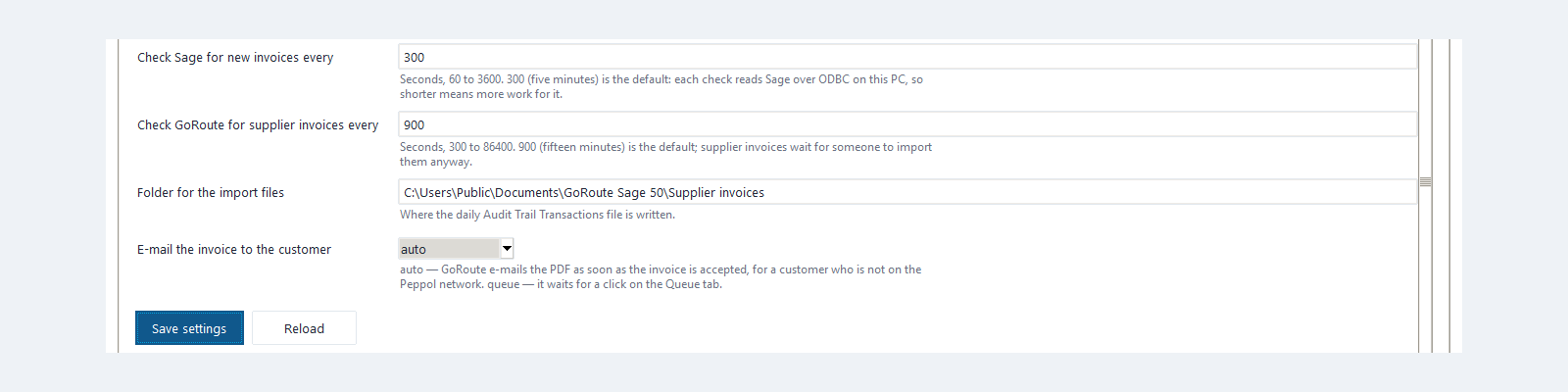
In Agent Status ▸ Settings, E-mail the invoice to the customer has two values:
| Value | What happens |
|---|---|
auto | GoRoute e-mails the PDF as soon as the invoice is accepted. Recommended. |
queue | The invoice waits on the Queue tab until someone selects it and clicks Send the e-mail now. Useful if you want to look at every outgoing document for the first few weeks. |
Click Save settings after changing it.
What you should see
On the Queue tab, the Detail column tells you where the e-mail stands:
| Detail | Meaning |
|---|---|
| sent and a time by e-mail | The e-mail has gone |
| sent; the e-mail is still to go | GoRoute has the invoice and is sending the e-mail |
| waiting for “Send the e-mail now” | The setting is queue. Select the row and click the button |
| e-mail refused and a reason | The address cannot receive mail. Correct it in Sage |
The customer receives one e-mail with the PDF attached. That PDF is the invoice.
Stop sending Sage's own PDF
Once a customer is served this way, stop e-mailing Sage's own invoice PDF to them. Otherwise they receive two documents for one sale and ask which one to pay. Check two habits:
- whoever prints or e-mails invoices from Sage leaves these customers out;
- any customer set up to be e-mailed automatically from Sage is taken off that run.
If it does not work
| You see | What to do |
|---|---|
| The readiness report lists Customers not on Peppol and with no e-mail address | Add the customer's e-mail on the Details tab in Sage, or ask them for their Peppol address. |
| e-mail refused on the Queue tab | Correct the e-mail address in Sage. Raise the invoice again if it was refused. |
| The customer says they are on Peppol | Ask for their Peppol address and put it in Analysis 1. See Tax codes and identifiers. |
Written for agent 0.2.x and the GoRoute portal release of 31 October 2026.