Tax codes and identifiers
What this covers
Two pieces of reference the bookkeeper and the accountant need: what each Sage tax code means on an e-invoice, and the address each customer is invoiced at on the Peppol network.
Before you start
Have Sage open at Settings ▸ Configuration ▸ Tax Codes beside the agent window.
Tax codes
Sage tax codes are set by each company. T1 is 20 % in a UK company and 19 % in a German one. So
the agent never assumes what a code means. An invoice that uses a code with no confirmed meaning is
held, never sent with a guessed rate.
Confirm the table
- Open Agent Status ▸ Tax codes. The agent proposes a meaning for every code, read from what Sage holds: the rate, the description, and the markers Sage sets for EC sales and reverse charge.
- For each row, compare Proposed with Rate in Sage and Description in Sage, and read Because.
- Click Confirm the proposed table, then Yes. From then on, invoices using these codes are sent with these treatments. Nothing already sent changes.
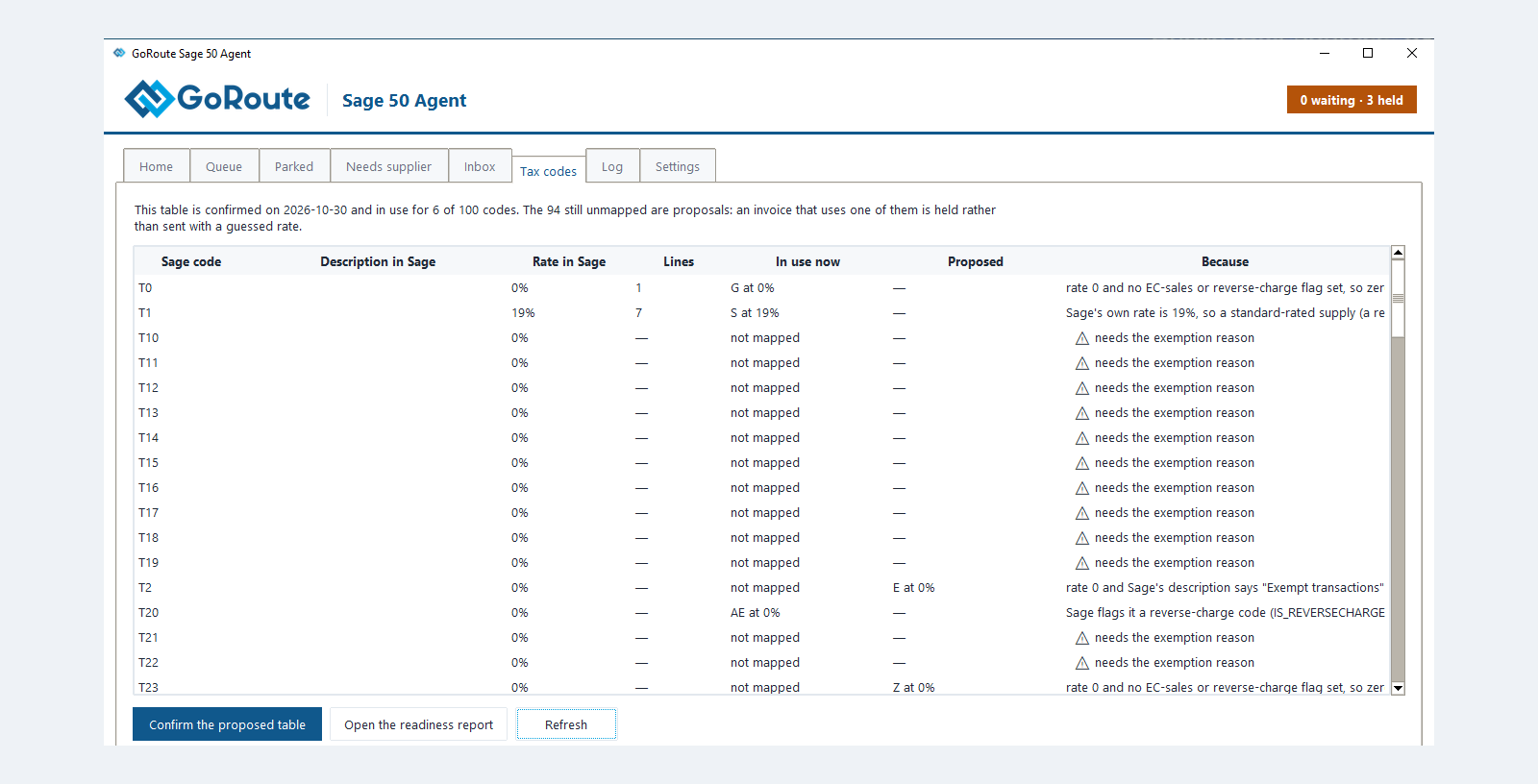
The tab will not confirm while a row needs something only you can supply:
- An exempt code needs the exemption reason that appears on your own paper invoices. Agree it with GoRoute.
- A row marked DISPUTED has two readings that give different VAT returns, for example zero-rated or outside the scope of VAT. Settle it with GoRoute, who sets that code, then confirm the rest.
This is the step that most repays care. A code mapped to the wrong meaning produces invoices that are accepted and wrong.
What the categories mean
| Category | Meaning on the e-invoice | Rate | Typical German company code |
|---|---|---|---|
S | Standard rate, including a reduced rate | 19 % or 7 % | T1 (19 %), T5 (7 %) |
Z | Zero-rated supply | 0 % | T0 |
E | Exempt supply, with the exemption reason | 0 % | T2 |
K | Intra-Community supply (reason VATEX-EU-IC) | 0 % | T4 |
AE | Reverse charge (reason VATEX-EU-AE) | 0 % | T20 |
G | Export outside the EU (reason VATEX-EU-G) | 0 % | your export code |
O | Outside the scope of VAT (reason VATEX-EU-O) | 0 % | T9 |
Your own codes decide. The last column only shows what a German company commonly uses.
The table works the other way too: a 19 % line on a supplier's e-invoice becomes your 19 % code in the import file. When you add or change a tax code in Sage, confirm it on the Tax codes tab in the same sitting.
Intra-EU sales need a delivery country and date
A zero-rated sale to a VAT-registered business in another EU country must say where the goods went and when.
- Country: give the customer a delivery address with a country (Customers ▸ the account ▸ Edit ▸ Delivery Addresses) and pick it on the invoice's Order view.
- Date: Sage records no despatch date. The agent uses the rule you chose in the installer, usually the invoice date.
The customer's Peppol address
Every e-invoice is addressed to the buyer's Peppol address, written scheme:identifier: four
digits, a colon, then the identifier, with no spaces.
9930:DE274991849
The agent finds it in this order:
- Analysis 1 on the customer's Custom tab in Sage, when it holds an address. What is there always wins.
- Otherwise, the customer's VAT registration number and the country on their address.
For most European business customers the VAT number is enough, and Analysis 1 stays empty.
If your company already uses Analysis 1 for its own analysis, the readiness report says so and names a free field to use instead. Never type Peppol addresses over your own analysis data.
Six countries where Analysis 1 is required
For customers in these countries a VAT number cannot be turned into a Peppol address. Fill in Analysis 1, or their invoices are refused.
| Customer's country | Why the VAT number is not enough | Usual scheme |
|---|---|---|
| Sweden | Its VAT scheme has been removed from the Peppol list | 0007, the organisation number |
| Denmark | Its old scheme has been removed from the Peppol list | 0184 |
| Norway | Its VAT scheme is deprecated | 0192, the organisation number |
| Finland | Finland's scheme is the OVT code, not the VAT number | 0216, the OVT code |
| Singapore | No VAT-based scheme | 0195, the UEN |
| Japan | No VAT-based scheme | 0188 or 0221 |
Ask the customer for their Peppol address. A business that receives e-invoices knows it, and it is often printed on their own invoices. Type it in exactly as given. Never guess one: a wrong address fails, or delivers your invoice to someone else.
A Swiss VAT number works on its own. Enter it as printed, for example CHE-123.456.789 MWST.
Fill in Analysis 1 elsewhere when
- a German public-sector buyer receives under its Leitweg-ID;
- the customer is registered on Peppol under a company-registration number;
- the customer tells you their Peppol address. That is always safer than working it out.
What you should see
The Tax codes tab says This table is confirmed … and in use, and the readiness report lists no customer under Customers with no Peppol address.
If it does not work
| You see | What to do |
|---|---|
| Tax code not confirmed on a parked invoice | Confirm the code on the Tax codes tab |
| Not confirmed when you press Confirm the proposed table | Read the sentence: an exemption reason or a disputed row is outstanding |
| Tax codes where Sage's rate and GoRoute's mapping do not match in the readiness report | The rate changed in Sage. Review the row and confirm again |
| A Swedish or Norwegian customer's invoices are refused | Put their Peppol address in Analysis 1 |
Written for agent 0.2.x and the GoRoute portal release of 31 October 2026.