The readiness report
What this covers
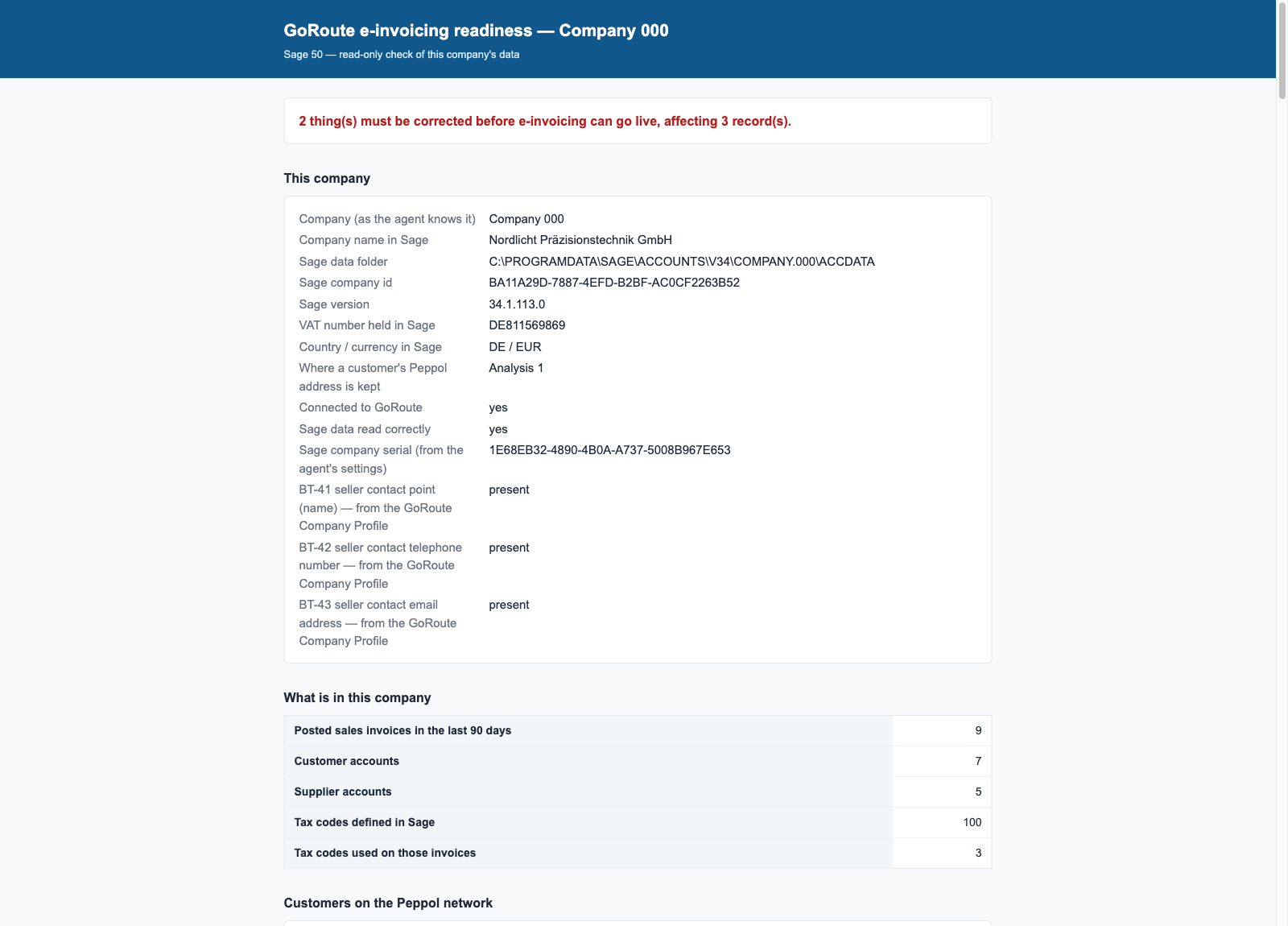
The readiness report reads your Sage company and your GoRoute settings and lists everything that would stop an invoice going out. It changes nothing and sends nothing. Run it at install, a few weeks after go-live, and after adding new customers.
Before you start
The agent is installed. Open the report from any of these:
- Start ▸ GoRoute ▸ Readiness Report
- the Readiness report button at the foot of the agent window
http://127.0.0.1:8731/readiness.htmlin a browser on the Sage PC
Steps
-
Read the first line. It is the verdict, for example This Sage company is ready for e-invoicing., or how many things must be corrected before go-live.
-
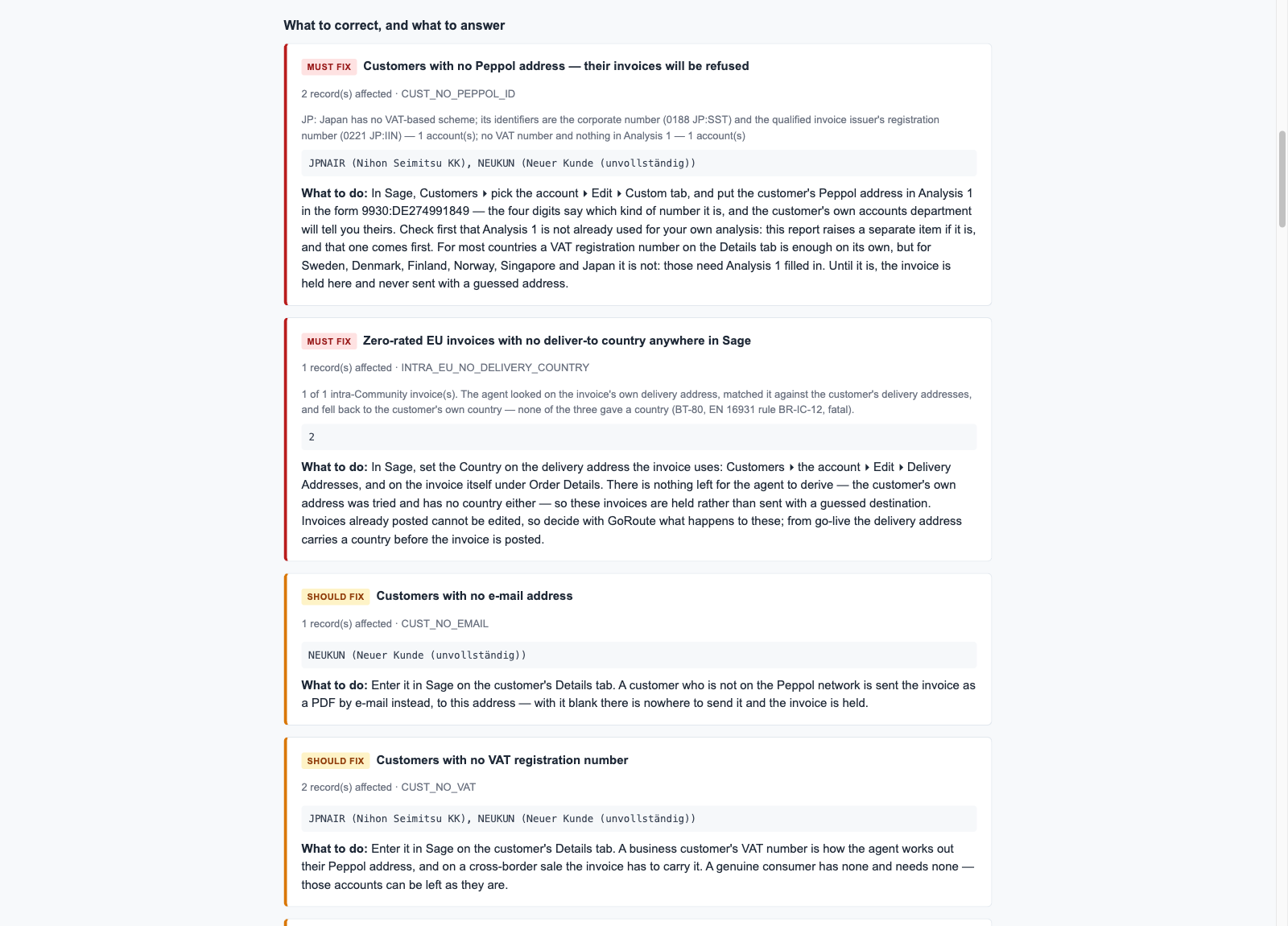
Work through the items from the top. Each one carries a label:
Label Meaning MUST FIX Invoices are refused until this is corrected PLEASE ANSWER A question to settle with GoRoute before go-live SHOULD FIX Nothing is blocked, but it is worth correcting FOR INFORMATION No action needed -
Read What to do under each item. It names the product to fix it in: Sage, the GoRoute portal, or the agent window. Looking in the wrong one is the most common mistake.
-
Fix the records, then open the report again.
The items you are most likely to meet
| Item | Where you fix it |
|---|---|
| Customers with no Peppol address — their invoices will be refused | Sage: the customer's VAT number on the Details tab, or their Peppol address in Analysis 1 on the Custom tab. See Tax codes and identifiers |
| Your own company's contact details are incomplete on the GoRoute profile | GoRoute portal: Company Settings (contact name, telephone, e-mail) |
| The VAT number in Sage is not the one GoRoute will invoice under | Stop. Confirm which number is right with whoever owns the VAT registration, then ask GoRoute to correct the wrong one |
| Tax codes used on posted invoices that GoRoute has no mapping for | Agent window: Tax codes tab |
| Windows is set to a different date order from the import file | Windows: set the short date to day first, then restart Sage |
| Sales invoices in Sage that the agent cannot see at all | A question about how invoices are raised. See Limits and FAQ |
| Zero-rated EU invoices with no deliver-to country anywhere in Sage | Sage: a delivery address with a country on the customer and on the invoice |
| Customers with no country on their address | Sage: the Country on the customer's address |
| Suppliers with no VAT registration number | Sage: the supplier's Details tab |
When the report says Analysis 1 is already used for something else on your customer records, do not type Peppol addresses into it. The report names a free field to use instead.
What you should see
The verdict reads This Sage company is ready for e-invoicing., or Nothing blocks go-live with only SHOULD FIX items left.
The report also lists which customers GoRoute found on the Peppol network. The others are invoiced by e-mail. See Customers not on Peppol.
If it does not work
| You see | What to do |
|---|---|
| This Sage company could not be read | The agent cannot sign in to Sage. See Troubleshooting. |
| This Sage company's data is missing columns the agent reads | Nothing in Sage fixes this. Click Send diagnostics in the agent window and contact GoRoute. |
| The report says it is being built | It is read in the background. Wait a minute and open it again. |
The report carries no invoice amounts and no keys, so you can e-mail it to your accountant or to GoRoute.
Written for agent 0.2.x and the GoRoute portal release of 31 October 2026.